Disclosure: As an Amazon Associate I earn from qualifying purchases. This site contains affiliate links.

Best AI Tools for Small Business in 2026: A Practical Guide

Local LLMs on NVIDIA Spark / ASUS GX10
Best AI Tools for Small Business in 2026: A Practical Guide
Let me cut through the hype: most "AI tools for business" listicles recommend enterprise platforms that cost $500/month and require a dedicated team to implement. That's not helpful if you're running a small business with 2-50 employees and a tight budget.
This guide is different. Every tool I recommend here meets three criteria: it costs under $100/month (most are under $50), it can be set up in under an hour without technical expertise, and it delivers measurable ROI within the first month. I've either used these tools myself for WikiWayne or verified them through small business owners in my network.
Why Small Businesses Need AI Tools Now
The gap between small businesses that adopt AI and those that don't is widening fast. A recent survey of small business owners found that those using AI tools report:
- 37% reduction in time spent on administrative tasks
- 28% increase in content output
- 23% improvement in customer response time
- $12,000-$25,000 annual savings on tasks previously outsourced or done manually
The artificial intelligence tools available in 2026 aren't just for tech companies anymore. They're practical, affordable, and designed for people who don't have engineering degrees. The question isn't whether AI will help your business -- it's which tools give you the best return for the least investment.

AI Tools by Business Function
Marketing and Content Creation
ChatGPT Plus or Claude Pro ($20/month each)
The Swiss Army knife. If you adopt only one AI tool, make it a general-purpose AI assistant. ChatGPT or Claude can handle an astonishing range of marketing tasks:
- Write blog posts, email newsletters, and social media captions
- Generate product descriptions for your entire catalog
- Draft press releases and PR pitches
- Create marketing copy for ads and landing pages
- Brainstorm campaign ideas and content calendars
- Analyze competitor messaging
My recommendation: Claude Pro for long-form content (blog posts, emails, documentation) because of its superior writing quality and large context window. ChatGPT Plus for quick tasks, image generation, and web research because of the broader toolset. See my full comparison in Claude vs ChatGPT vs Gemini.
Canva (Free - $15/month)
AI-powered design for non-designers. Canva's Magic Studio features have turned it into a genuine AI design platform. Generate social media graphics, edit photos, create presentations, and produce marketing materials -- all with AI assistance that makes design accessible to anyone.
Best for: Social media graphics, presentations, simple video editing, brand assets. The free tier is genuinely useful; Pro at $15/month unlocks the AI features.
Writesonic ($16/month)
SEO content at scale. If your business depends on organic search traffic, Writesonic combines AI writing with SEO optimization. It analyzes top-ranking content, generates optimized articles, and suggests improvements. For a small business blog, this is a massive time saver. For more options, see my AI SEO tools guide.
Customer Service
Tidio ($29/month starter)
AI chatbot that works. Tidio's AI chatbot, Lyro, can handle up to 70% of common customer inquiries automatically. It learns from your FAQ, product pages, and support history to answer questions accurately. When it can't help, it smoothly hands off to a human agent.
Why it matters for small business: A 24/7 customer service presence that doesn't require overnight staff. The $29/month starter plan includes the AI chatbot, live chat, and basic analytics -- a fraction of what a single customer service hire would cost.
Freshdesk ($0-15/agent/month)
AI-powered help desk. Freshdesk's AI features include automatic ticket categorization, suggested responses for agents, and sentiment detection. The free tier supports up to 2 agents, making it a zero-cost starting point for small teams.
Best for: Businesses receiving 10+ support tickets/day that need to organize, prioritize, and respond faster.
ChatGPT for customer email templates
Free and effective. For businesses not ready for a dedicated chatbot, using ChatGPT to draft customer service email templates can dramatically improve response quality and speed. Create templates for your 20 most common inquiries, customize the tone, and train your team to adapt them.
Accounting and Finance
QuickBooks with AI features ($30/month)
Automated bookkeeping. QuickBooks has integrated AI features that automatically categorize transactions, match receipts, flag unusual expenses, and generate financial insights. For small businesses that dread month-end bookkeeping, the automation handles 80% of the routine work.
Ramp ($0 for the card)
AI-powered expense management. Ramp's corporate card comes with AI that automatically categorizes expenses, detects duplicate charges, identifies wasteful subscriptions, and suggests cost savings. The average Ramp user saves 5% on total spend. The card itself is free -- Ramp earns from interchange fees.
Fathom ($0-39/month)
Financial reporting AI. Fathom connects to your accounting software and uses AI to generate visual financial reports, KPI dashboards, and management commentary. It turns raw accounting data into insights that help you make better business decisions. The free tier works with a single entity.
HR and Team Management
Gusto ($40/month + $6/person)
All-in-one HR with AI. Gusto handles payroll, benefits, hiring, and compliance for small businesses, with AI features that automate tax calculations, generate offer letters, and flag compliance issues before they become problems.
Notion AI ($10/member/month add-on)
Team knowledge base. For small teams, Notion AI serves as an internal wiki, project tracker, and document hub. The AI can answer new employee questions, summarize project status, and generate documentation -- reducing the overhead of onboarding and knowledge management.
Calendly ($0-12/seat/month)
AI scheduling for client-facing businesses. Calendly's AI features optimize meeting scheduling, reduce no-shows with smart reminders, and provide analytics on your meeting patterns. For service businesses that live by appointments, the time savings are immediate.
Sales and CRM
HubSpot CRM (Free - $20/month)
AI-enhanced customer management. HubSpot's free CRM includes AI features for email tracking, contact scoring, and conversation intelligence. The paid tiers add AI content generation, predictive lead scoring, and automated sequences.
Apollo.io ($0-49/user/month)
AI-powered sales intelligence. Apollo combines a contact database with AI-powered outreach tools -- email sequences, call scripts, and engagement scoring. For B2B businesses, it replaces manual prospecting with intelligent automation.
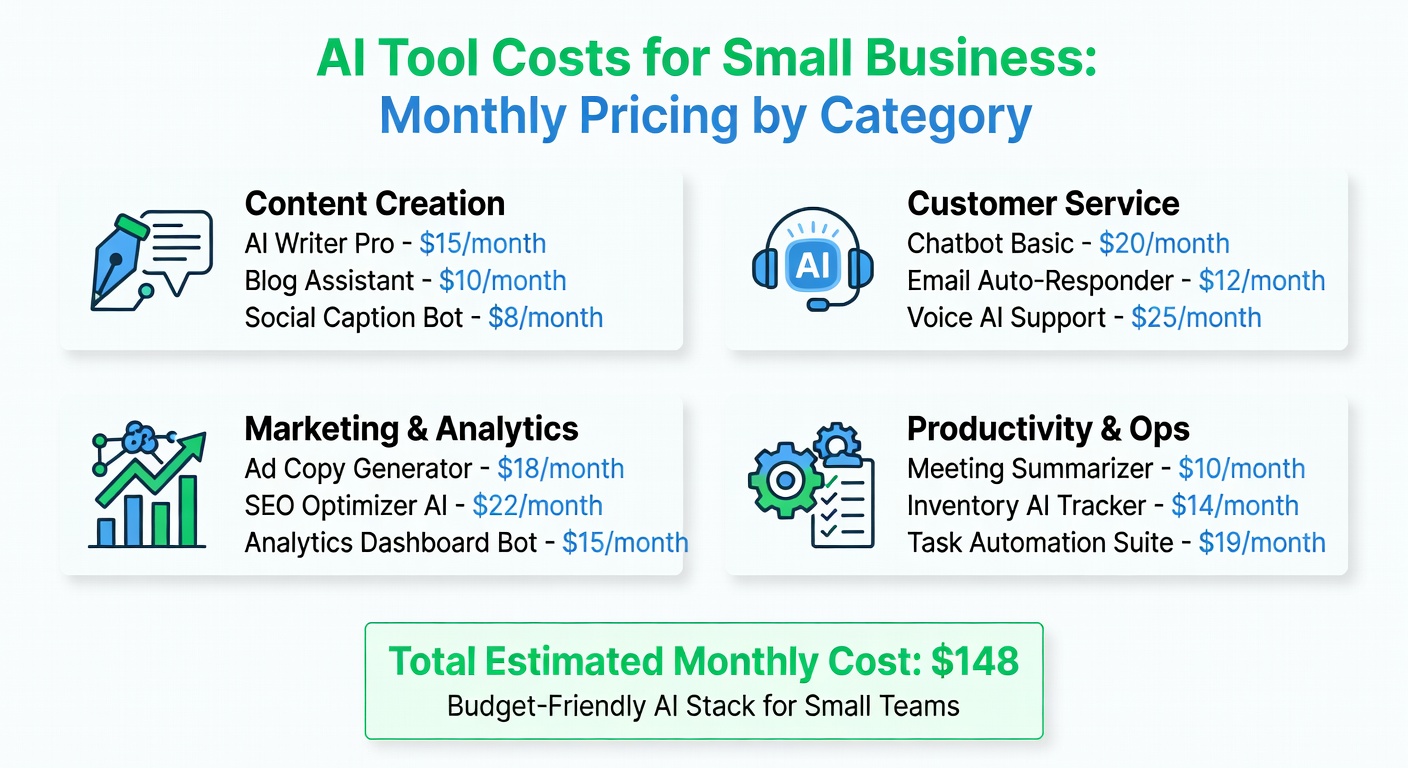
The Small Business AI Stack: Three Budget Levels
Bootstrap Stack ($0-$50/month)
| Category | Tool | Cost |
|---|---|---|
| Content/Marketing | ChatGPT Free or Claude Free | $0 |
| Design | Canva Free | $0 |
| Customer Service | Freshdesk Free | $0 |
| CRM | HubSpot Free | $0 |
| Scheduling | Calendly Free | $0 |
| Total | $0/month |
Yes, you can build a functional AI stack for free. The limitations on free tiers are real, but for a brand-new business, this is a solid starting point.
Growth Stack ($50-$150/month)
| Category | Tool | Cost |
|---|---|---|
| Content/Marketing | Claude Pro | $20 |
| SEO | Writesonic Individual | $16 |
| Design | Canva Pro | $15 |
| Customer Service | Tidio Starter | $29 |
| CRM | HubSpot Starter | $20 |
| Meeting Notes | Otter.ai Pro | $16.99 |
| Total | $116.99/month |
This is the sweet spot for most small businesses with revenue. Every tool pays for itself in time saved or revenue generated within the first month.
Professional Stack ($150-$300/month)
| Category | Tool | Cost |
|---|---|---|
| Content/Marketing | Claude Pro + ChatGPT Plus | $40 |
| SEO | Writesonic Standard | $79 |
| Design | Canva Pro | $15 |
| Customer Service | Tidio Growth | $59 |
| Superhuman | $25 | |
| CRM | HubSpot Starter | $20 |
| Meeting Notes | Otter.ai Pro | $16.99 |
| Total | $254.99/month |
For businesses with 5-20 employees where time is the primary constraint.
How to Evaluate AI Tools for Your Business
Before adopting any AI tool, ask these five questions:
1. What specific task does this replace or accelerate? If you can't name the exact task, you don't need the tool. "It uses AI" is not a use case.
2. What's the time savings per week? Estimate conservatively. If a $20/month tool saves 1 hour/week, that's roughly $0.46/hour -- almost certainly worth it.
3. How long to set up? If implementation takes more than a few hours, the tool needs to save significantly more time to justify the investment. Most small businesses don't have dedicated IT staff for lengthy setups.
4. Does it integrate with tools I already use? A great tool that exists in isolation creates more overhead, not less. Check that it connects to your email, calendar, CRM, or whatever your core workflow tools are.
5. What happens to my data? Understand where your business data goes, how it's stored, and what the vendor does with it. This matters more than ever in 2026 with evolving data privacy regulations.
Common Mistakes Small Businesses Make with AI
Adopting too many tools at once. Start with one. Get value from it. Then add another. The worst outcome is paying for six AI subscriptions that no one on your team actually uses.
Expecting AI to work without input. AI tools need guidance -- clear prompts, good context, and human review. The quality of your output directly correlates with the quality of your input.
Skipping the free tiers. Almost every tool listed here has a free or trial version. Use it. The paid features are worth evaluating, but only after you've confirmed the tool fits your workflow.
Not measuring ROI. Track time saved, tasks automated, or revenue attributed to each tool. Cancel anything that isn't delivering measurable value within 60 days.
Using AI for sensitive decisions without oversight. AI is great for drafting, analyzing, and suggesting. It's not great for making final decisions about hiring, legal compliance, or financial strategy. Always have a human in the loop for high-stakes decisions.
For a deeper understanding of how AI assistants work and how to get more from them, the book Prompt Engineering for Generative AI is worth every penny. Better prompts mean better results from every AI tool you use.
The Physical Setup Matters Too
AI tools multiply your productivity, but they can't fix a bad workspace. If you're running your business from a laptop at the kitchen table, investing in a proper setup delivers compounding returns. A second monitor like the LG 27UN850-W lets you run your AI tool on one screen and your actual work on the other -- the productivity difference is immediate. And a reliable portable backup like the Samsung T7 protects business-critical files from laptop disasters.
For the complete setup, check out my best home office setup guide.

FAQs
What's the single best AI tool for a small business?
If I could only choose one, it would be Claude Pro or ChatGPT Plus ($20/month). A general-purpose AI assistant handles the widest range of tasks -- writing, analysis, customer communication, brainstorming, research -- and delivers immediate value regardless of your industry.
Are free AI tools good enough for a real business?
For getting started, absolutely. The free tiers of ChatGPT, Canva, HubSpot, Freshdesk, and Calendly create a functional AI stack at zero cost. As your business grows and your time becomes more valuable, upgrading to paid tiers with more features and higher limits makes sense.
How do I train my team to use AI tools?
Start with one tool and one use case. Show your team the specific workflow -- "here's how to draft a customer email using Claude" -- and let them practice. Avoid dumping five new tools on them simultaneously. Most tools have excellent onboarding tutorials built in.
Is my business data safe with AI tools?
Reputable AI tools use encryption, don't train on your data (check each vendor's privacy policy), and comply with data protection regulations. However, avoid putting highly sensitive information (social security numbers, credit card data, trade secrets) into any AI tool. Use them for business communication and content, not sensitive data processing.
What industries benefit most from AI tools?
Every industry benefits, but the highest immediate ROI tends to be in: professional services (time savings on documentation and communication), e-commerce (product descriptions, customer service), real estate (listing descriptions, lead management), and marketing agencies (content creation at scale).
The Bottom Line
AI tools in 2026 have reached the point where not using them is a competitive disadvantage for small businesses. The good news: you don't need a big budget or technical expertise to get started. The tools are affordable, accessible, and designed for people who have businesses to run -- not IT departments to manage.
Start small. Pick the one area where you waste the most time. Adopt the right tool. Measure the impact. Then expand from there. The businesses that thrive in the next few years won't necessarily be the ones with the biggest budgets -- they'll be the ones that learn to leverage AI as a force multiplier.
What AI tools have made the biggest difference in your small business? I'm always looking for recommendations I haven't covered. Share your favorites on X (@wikiwayne).
Recommended Gear
These are products I personally recommend. Click to view on Amazon.
Logitech MX Keys S Wireless — Great pick for anyone following this guide.
Sony WH-1000XM5 — Great pick for anyone following this guide.
 Samsung T7 Portable SSD 1TB — Great pick for anyone following this guide.
 LG 27UN850-W 4K UHD — Great pick for anyone following this guide.
 ASUS ProArt PA279CRV 27" 4K — Great pick for anyone following this guide.
 Prompt Engineering for Generative AI — Great pick for anyone following this guide.
This article contains affiliate links. As an Amazon Associate I earn from qualifying purchases. See our full disclosure.
Affiliate Disclosure: As an Amazon Associate I earn from qualifying purchases. This site contains affiliate links.