Tether Swing City
PL-087HardGamesThree.js
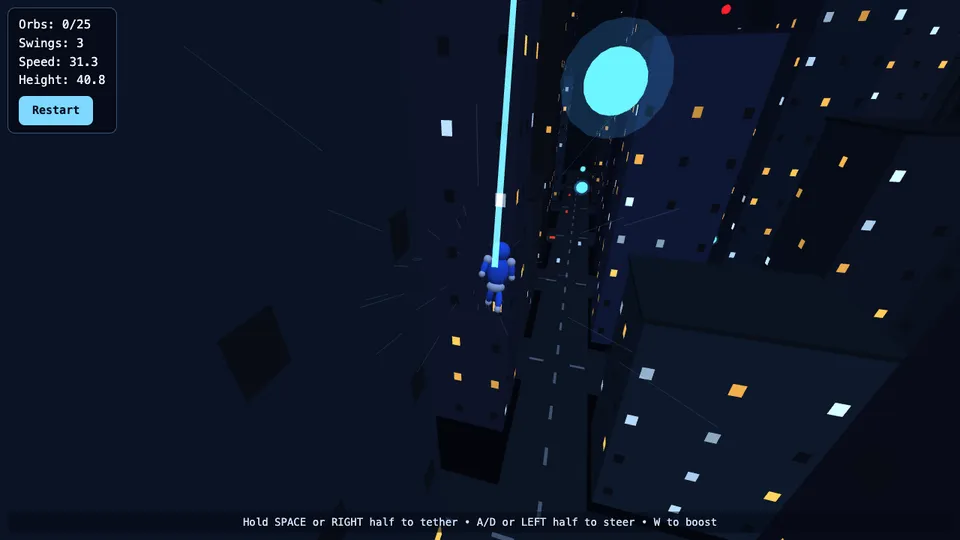
A web-swinging game in a night city: pendulum physics, building collisions, endless streaming, a chase camera and touch controls.
Download fileMade for ChatGPT, Claude, Gemini, Grok and other AI tools
How to run
- Download the file or copy the prompt.
- Upload or paste it into any AI chat or coding tool, and send.
- Save the HTML it gives you as a file and open it in Chrome.
What it tests
A web-swinging game in a night city: pendulum physics, building collisions, endless streaming, a chase camera and touch controls.
Runs by model
7 models tried this prompt on a first try; 5 passed. Showing 4.
- swe-2-highvia Devin CLI2026-11-07First tryTest rig (automatic)Pass60.1 fps
- swe-2-maxvia Devin CLI2026-11-07First tryTest rig (automatic)Pass60.1 fps
- swe-2-flash-highvia Devin CLI2026-11-06First tryTest rig (automatic)Pass60 fps
- swe-2-flash-mediumvia Devin CLI2026-11-06First tryTest rig (automatic)Pass60.1 fps
Show the full prompt
PL-087 "Tether Swing City": build a playable web-swinging game in a single HTML file using Three.js (CDN), in an original night city. The player is an original masked hero with a plain blue and silver suit (no existing characters, no logos, no spider theme or spider logo) who swings on glowing tethers between skyscrapers.

WORLD
- A procedurally generated city of at least 120 skyscrapers (heights 20 to 120 units) on a grid with streets 12 units wide, windows lit warm yellow or cool white (random 40 percent lit, instanced), roof antennas with blinking red lights, a dark navy sky with stars and a large moon, fog, and 40 or more tiny moving cars (instanced light dots) in the streets. The city streams around the player so it feels endless (chunks created and removed, geometry count stays flat).
PLAYER AND PHYSICS
- Press and hold Space (desktop) or press and hold on the right half of the screen (touch) to fire a tether at the nearest building surface ahead and above, within 60 units. A glowing tether line connects the player's hand to the anchor point. While held, the player swings as a real pendulum (rope length fixed at the moment of attachment, gravity 25 units per second squared, energy kept) and is pulled by the rope. Release to let go and fly with momentum, then fire again.
- Left half of the screen or A and D steer sideways; W gives a small forward boost while swinging. Landing on a roof or the street slows to a stop and lets the player run with the same controls.
- Collision: the player cannot enter a building (bounce off with a small recoil), and cannot fall below the street.
- Camera: third-person chase that eases behind the velocity direction, with a field-of-view widening with speed (60 to 85 degrees), motion streaks at high speed, and no clipping into buildings.
- Collectibles: 25 glowing blue orbs placed between buildings; touching one adds to the score with a chime sound (Web Audio, after the first tap).
- HUD (14 px or larger, readable): "Orbs: N/25" (real pickups), "Swings: N" (real tether attachments), "Speed: N" (real speed in units per second), "Height: N" (real height). A "Restart" button.
- Fixed seed 87.

CHECKLIST
1. Screenshot at 3 s: a night city of tall lit buildings, the hero mid-swing with a visible glowing tether to a building, readable HUD.
2. Swing physics: with a 30-unit rope the swing period is within 15 percent of 2 pi times the square root of length over gravity for small angles (print the measured period).
3. Speed readout equals the length of the real velocity vector within 2 percent; Swings goes up by exactly 1 per tether attachment.
4. The player never ends up inside a building over a 3-minute scripted run of random inputs (print how many times the collision test caught it), and never falls under the street.
5. Collecting an orb plays a chime and raises Orbs by exactly 1; geometry count stays within 10 percent of the start after 3 minutes of flying.
6. Smooth (about 60 fps desktop, 30 or more iPhone), works with touch controls, zero console errors.

RULES FOR EVERY BUILD
- Output ONE self-contained file named index.html: inline CSS and JS, three.js from a public CDN only (for example https://cdn.jsdelivr.net/npm/three@0.160.0/build/three.module.js with an import map, or the r128 script tag), no other files, no build step, no external images, models, fonts or audio. Add <link rel="icon" href="data:,"> so there is no favicon 404.
- It must open straight from disk in desktop Chrome and on an iPhone in Safari with touch, fill the screen, resize cleanly, and show no scrollbars at 390x844 or 1280x720. Cap devicePixelRatio at 2. Clamp the frame time to 0.05 s. Pause when the tab is hidden.
- Zero console errors or warnings on load and while interacting. Never log in a per-frame loop.
- Public-safe: no real people, no brand names or logos, no copyrighted characters.
- Every on-screen counter or readout must change only because of the real event it names (never a timer that fakes it) and must also be available as window.__stats so it can be checked by script.
- A frozen frame must be readable: every label, counter and button has contrast of at least 4.5:1 against what is behind it and text at least 14 px.

WORK LOOP (do this yourself before answering; take as many turns as you need)
1. Build the file.
2. If you can run code: open it in a real browser, read the console, take screenshots at 3 s, 10 s and 20 s, and exercise every interaction. If you cannot run code, trace the code against the checklist line by line and say so.
3. Mark every checklist item PASS or FAIL with the measured number or what you saw. Mark PASS only when it is visibly true on screen, not just present in code.
4. Fix every FAIL and recheck. Repeat until all items pass or you run out of turns, then say which still fail.
5. Final answer: the complete index.html in ONE code block, output once, then the checklist with PASS/FAIL. Nothing else.
Built one? Post it on X and tag @wikiwaynePost on X