Wizard's Chess
PL-083Very HardGamesThree.js
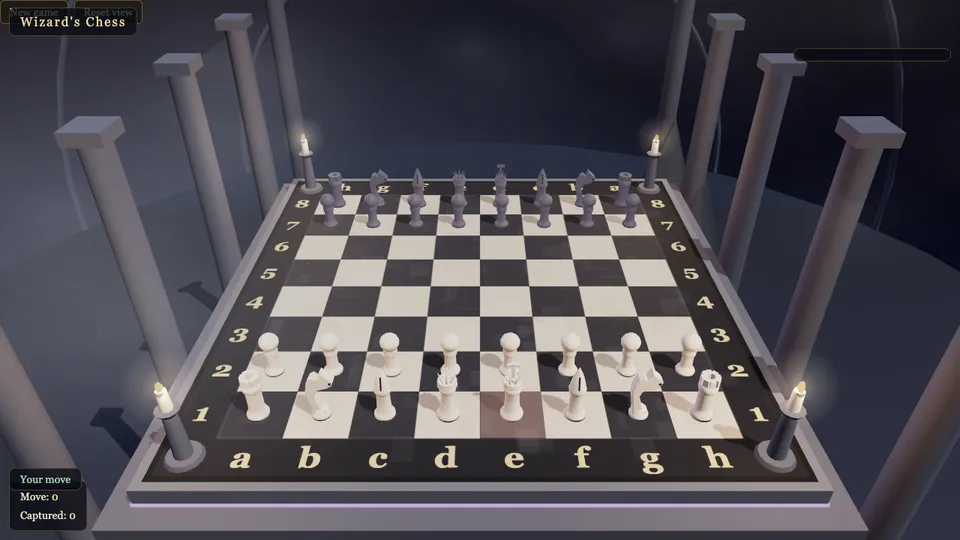
A playable gothic chess game: correct rules, move generation, a simple computer opponent and a shattering effect on captures.
Download fileMade for ChatGPT, Claude, Gemini, Grok and other AI tools
How to run
- Download the file or copy the prompt.
- Upload or paste it into any AI chat or coding tool, and send.
- Save the HTML it gives you as a file and open it in Chrome.
What it tests
A playable gothic chess game: correct rules, move generation, a simple computer opponent and a shattering effect on captures.
Runs by model
7 models tried this prompt on a first try; 5 passed. Showing 4.
- swe-2-flash-maxvia Devin CLI2026-11-06First tryTest rig (automatic)Pass60.1 fps
- swe-2-maxvia Devin CLI2026-11-07First tryTest rig (automatic)Pass60 fps
- swe-2-flash-mediumvia Devin CLI2026-11-06First tryTest rig (automatic)Pass60 fps
- swe-2-highvia Devin CLI2026-11-07First tryTest rig (automatic)Pass60 fps
Show the full prompt
PL-083 "Wizard's Chess": build a playable 3D chess game with a gothic wizard theme in a single HTML file using Three.js (CDN) and Web Audio (all sounds made in code, started only after the first tap). All original: no brand names, no film characters.

BOARD AND PIECES
- A stone board 8 x 8 (dark slate #2b2f3a and pale marble #cfc8b8 squares) floating over a dark cavern with candles on 4 corner stands (flickering flames with warm point lights), faint mist, and a vaulted hall behind.
- 32 pieces built from lathe and extrude shapes in two stone colours (obsidian #1b1b24 and ivory #e9e1cf). Each type must read at a glance: pawn (round head), rook (tower with battlements), knight (horse head silhouette), bishop (pointed hat with a slit), queen (crown of points), king (crown with a cross).
RULES (the game must be correct)
- Full legal chess: every piece moves correctly, check, checkmate and stalemate are detected, castling both sides, en passant, pawn promotion (auto-queen is fine), and illegal moves that leave your own king in check are refused. White is the player; Black is a computer opponent that answers in under 2 seconds using a simple search (depth 2 or more) and never plays an illegal move.
- Click or tap a piece to select it: its legal squares glow green; click a square to move. Pieces slide with an ease of about 0.5 s with a small hop; knights jump over.
- Captures: the captured piece shatters into 12 or more stone fragments that fall with gravity and fade out in 2 s, with a thud sound and a dust puff. A move click and a capture have different sounds.
- Camera: orbits by drag, snaps to the player's side by a "Reset view" button, never goes below the board.
- HUD: "Move: N" (real half-move count), "Captured: N" (real captures), a move list panel (algebraic text, 14 px) and a status line ("Your move", "Check", "Checkmate").
- "New game" button resets everything.
- Fixed seed 83 for the computer's tie-breaks.

CHECKLIST (test with scripted moves through window.__game.move("e2e4") style hooks you add)
1. Screenshot at 3 s: a full set of 32 readable pieces, the glowing candles and the board labelled by rank and file.
2. Play the Scholar's mate line (e4, e5, Bc4, Nc6, Qh5, Nf6, Qxf7#) and confirm the game reports checkmate.
3. Test castling, en passant and promotion each once with a prepared position; print the three results.
4. An illegal move (moving into check, or a bishop through a piece) is refused and the piece stays put.
5. Move and Captured counters match the real game state; a capture shows the shatter fragments.
6. Computer replies in under 2 s without an illegal move across 10 moves; zero console errors; smooth at 60 fps desktop and 30 or more iPhone.

RULES FOR EVERY BUILD
- Output ONE self-contained file named index.html: inline CSS and JS, three.js from a public CDN only (for example https://cdn.jsdelivr.net/npm/three@0.160.0/build/three.module.js with an import map, or the r128 script tag), no other files, no build step, no external images, models, fonts or audio. Add <link rel="icon" href="data:,"> so there is no favicon 404.
- It must open straight from disk in desktop Chrome and on an iPhone in Safari with touch, fill the screen, resize cleanly, and show no scrollbars at 390x844 or 1280x720. Cap devicePixelRatio at 2. Clamp the frame time to 0.05 s. Pause when the tab is hidden.
- Zero console errors or warnings on load and while interacting. Never log in a per-frame loop.
- Public-safe: no real people, no brand names or logos, no copyrighted characters.
- Every on-screen counter or readout must change only because of the real event it names (never a timer that fakes it) and must also be available as window.__stats so it can be checked by script.
- A frozen frame must be readable: every label, counter and button has contrast of at least 4.5:1 against what is behind it and text at least 14 px.

WORK LOOP (do this yourself before answering; take as many turns as you need)
1. Build the file.
2. If you can run code: open it in a real browser, read the console, take screenshots at 3 s, 10 s and 20 s, and exercise every interaction. If you cannot run code, trace the code against the checklist line by line and say so.
3. Mark every checklist item PASS or FAIL with the measured number or what you saw. Mark PASS only when it is visibly true on screen, not just present in code.
4. Fix every FAIL and recheck. Repeat until all items pass or you run out of turns, then say which still fail.
5. Final answer: the complete index.html in ONE code block, output once, then the checklist with PASS/FAIL. Nothing else.
Built one? Post it on X and tag @wikiwaynePost on X