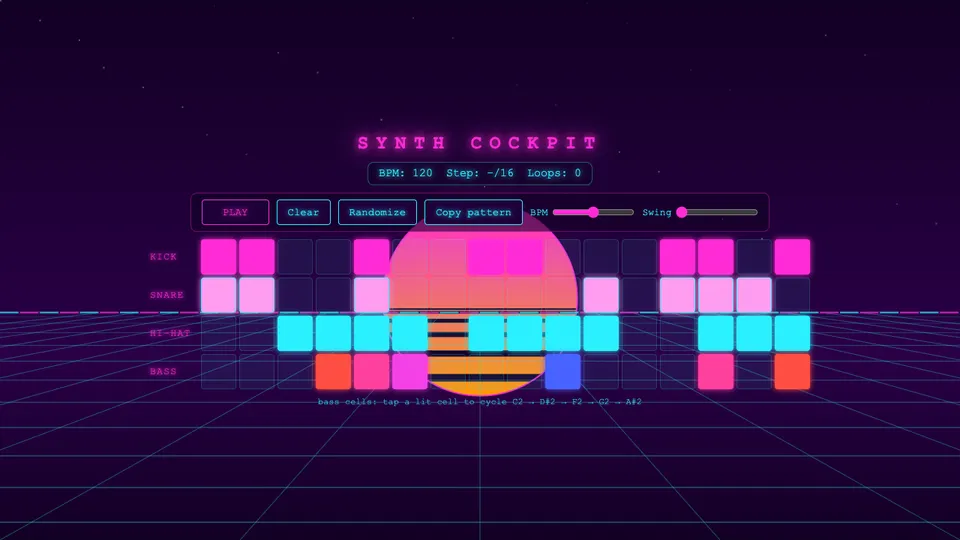
Synth Cockpit
PL-069HardPage layouts & UICanvas 2D, Three.js
A playable four-track step-sequencer synth: a look-ahead audio scheduler, swing, pitched bass steps and a visual driven by the sound.
Download fileMade for ChatGPT, Claude, Gemini, Grok and other AI tools
How to run
- Download the file or copy the prompt.
- Upload or paste it into any AI chat or coding tool, and send.
- Save the HTML it gives you as a file and open it in Chrome.
What it tests
A playable four-track step-sequencer synth: a look-ahead audio scheduler, swing, pitched bass steps and a visual driven by the sound.
Runs by model
7 models tried this prompt on a first try; 1 passed. Showing 4.
- swe-2-mediumvia Devin CLI2026-11-07First tryTest rig (automatic)Pass60 fps
- swe-2-flash-highvia Devin CLI2026-11-06First tryTest rig (automatic)Fail
Objects fell through the floor.
- swe-2-flash-maxvia Devin CLI2026-11-06First tryTest rig (automatic)Fail
Objects fell through the floor.
- swe-2-flash-mediumvia Devin CLI2026-11-06First tryTest rig (automatic)Fail
It didn't pass the test rig's automatic checks.
Show the full prompt
PL-069 "Synth Cockpit": build a playable step-sequencer synth with a 3D-reactive visual in a single HTML file using Web Audio and Canvas 2D or Three.js (from a CDN). Style: neon synthwave, background #120024, accents #ff2bd6 and #2bf0ff.

- 4 tracks: kick, snare, hi-hat and bass. All sounds are synthesized live with Web Audio oscillators and noise. No audio files.
- 16-step grid per track, with each cell at least 36x36 px and a 4px gap. Active cells are lit; the current step column glows.
- Timing uses a lookahead scheduler (AudioContext.currentTime plus setTimeout or setInterval), NOT setInterval alone, so the beat stays tight even when the tab is busy.
- BPM slider from 60 to 180 (default 120). Swing slider from 0 to 60%.
- The bass track has a pitch per step: click a lit bass cell to cycle through C2, D#2, F2, G2 and A#2.
- Behind the grid there's a visualizer driven by an AnalyserNode: a synthwave sun and grid floor pulse with the kick, plus a live frequency bar strip.
- Preloaded with a seeded default pattern (seed 69) so pressing Play makes music right away. A Play/Stop button is required: audio starts only after a user tap, which iPhone needs.
- Buttons: "Clear", "Randomize" (seeded, reproducible: pressing it twice after a reload gives the same 2 patterns), and "Copy pattern" (copies a JSON string to the clipboard).
- Top panel: "BPM: N", "Step: N/16" (matches the glowing column), "Loops: N" (goes up by 1 only when step 16 wraps to step 1).

PASS/FAIL CRITERIA
1. Pressing Play makes music within 1 second, on desktop and on iPhone.
2. The beat stays steady for 2 minutes with no audible drift, and the step glow stays in sync with the sound.
3. BPM and swing change live without stopping playback.
4. Bass cells cycle through the 5 notes and sound at those pitches.
5. The visualizer visibly reacts to the kick, and the frequency bars move with the audio.
6. "Step" and "Loops" counts always match what's on screen and what you hear.
7. Randomize is reproducible after a reload, and Copy pattern puts valid JSON on the clipboard.
8. Zero console errors.


RULES FOR EVERY BUILD
- Output ONE self-contained file named index.html: inline CSS and JS, any library only from a public CDN, no other files, no build step. Add <link rel="icon" href="data:,"> so there is no favicon 404.
- It must open straight from disk in desktop Chrome and on an iPhone in Safari, fill the screen, and resize cleanly with no scrollbars.
- Zero console errors or warnings on load and while interacting.
- Animation runs on requestAnimationFrame and stays smooth (about 60fps on a laptop).

WORK LOOP (do this yourself before answering)
1. Build the file.
2. If you can run code, open it in a browser, read the console, take screenshots at 3 s and 6 s, and test the interactions. If you can't run code, mentally trace the code against the checklist line by line.
3. Mark every checklist item PASS or FAIL. Mark PASS only when it is visibly true on screen, not just present in the code.
4. Fix every FAIL and recheck. Repeat until all items pass.
5. Final answer: the complete index.html in ONE code block, output once, then the checklist with PASS/FAIL. Nothing else.
Built one? Post it on X and tag @wikiwaynePost on X