Glass Weather
PL-063EasyPage layouts & UIHTML/CSS, SVG
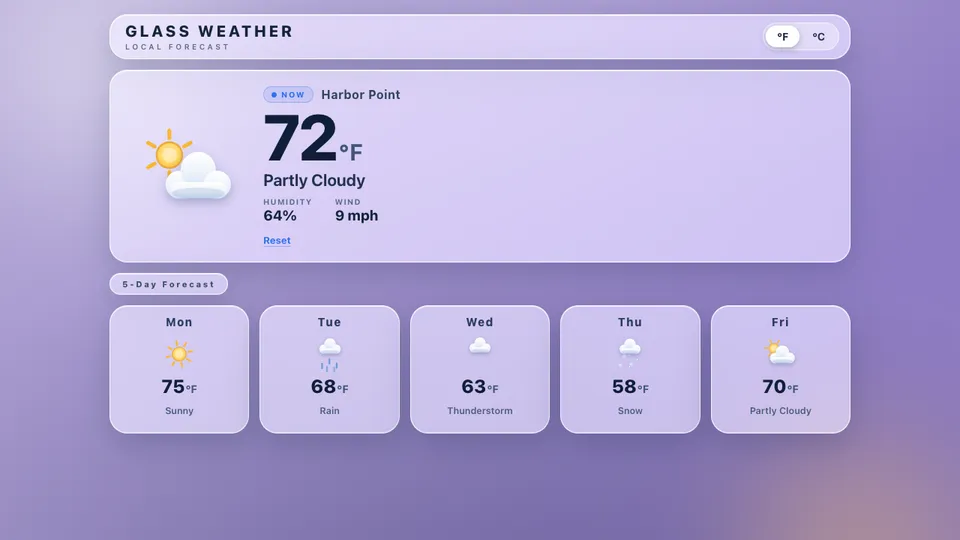
A frosted-glass weather dashboard: hand-drawn animated SVG icons, exact data, a unit toggle and a responsive layout.
Download fileMade for ChatGPT, Claude, Gemini, Grok and other AI tools
How to run
- Download the file or copy the prompt.
- Upload or paste it into any AI chat or coding tool, and send.
- Save the HTML it gives you as a file and open it in Chrome.
What it tests
A frosted-glass weather dashboard: hand-drawn animated SVG icons, exact data, a unit toggle and a responsive layout.
Runs by model
7 models tried this prompt on a first try; 6 passed. Showing 4.
- swe-2-flash-maxvia Devin CLI2026-11-06First tryTest rig (automatic)Pass60.1 fps
- swe-2-highvia Devin CLI2026-11-07First tryTest rig (automatic)Pass60.1 fps
- swe-2-flash-highvia Devin CLI2026-11-06First tryTest rig (automatic)Pass60.1 fps
- swe-2-flash-mediumvia Devin CLI2026-11-06First tryTest rig (automatic)Pass60 fps
Show the full prompt
Build "GLASS WEATHER": a glassmorphism weather dashboard using only HTML, CSS and inline SVG with plain JavaScript. No libraries and no real weather API. Use the made-up sample data below exactly.

DATA (use these exact values)
- City: "Harbor Point"
- Now: 72°F, Partly Cloudy, Humidity 64%, Wind 9 mph
- Next 5 days: Mon 75° Sunny, Tue 68° Rain, Wed 63° Thunderstorm, Thu 58° Snow, Fri 70° Partly Cloudy

LOOK
- A full-screen animated gradient sky behind everything, slowly shifting between #4A6FA5, #8E7CC3 and #F2A65A over about 20 seconds.
- Frosted glass cards: backdrop blur, a semi-transparent white fill, a 1px light border and rounded corners of at least 20px. Text sits on the glass with enough contrast to read in any frozen frame.
- One big "Now" card, and a row of 5 day cards below it that wraps or stacks neatly on an iPhone in portrait with no overflow.

ICONS (the stress test)
- Draw 5 animated SVG weather icons yourself: sun (slowly rotating rays), partly cloudy (a cloud drifting over a sun), rain (falling drops), thunderstorm (a cloud with a lightning flash about every 3 seconds), and snow (drifting flakes).
- Each day card shows the right icon for its weather, and the Now card uses the large partly cloudy icon.
- A °F/°C toggle switches every temperature on the page at once, rounded to whole numbers (72°F becomes 22°C).
- Hovering or tapping a day card lifts it slightly and shows that day's details in the Now card. A "Reset" link returns the Now card to today.

CHECKLIST
1. One index.html file, no libraries, opens with zero console errors.
2. All the data values appear exactly as given.
3. 5 different animated icons, each matching its day.
4. The °F/°C toggle converts every temperature correctly.
5. Tapping a day card updates the Now card, and Reset works.
6. The glass blur is visible and all text is readable.
7. The layout fits an iPhone in portrait with no sideways scroll.

RULES FOR EVERY BUILD
- Output ONE self-contained file named index.html: inline CSS and JS, any library only from a public CDN, no other files, no build step. Add <link rel="icon" href="data:,"> so there is no favicon 404.
- It must open straight from disk in desktop Chrome and on an iPhone in Safari, fill the screen, and resize cleanly with no scrollbars.
- Zero console errors or warnings on load and while interacting.
- Animation runs on requestAnimationFrame and stays smooth (about 60fps on a laptop).

WORK LOOP (do this yourself before answering)
1. Build the file.
2. If you can run code, open it in a browser, read the console, take screenshots at 3 s and 6 s, and test the interactions. If you can't run code, mentally trace the code against the checklist line by line.
3. Mark every checklist item PASS or FAIL. Mark PASS only when it is visibly true on screen, not just present in the code.
4. Fix every FAIL and recheck. Repeat until all items pass.
5. Final answer: the complete index.html in ONE code block, output once, then the checklist with PASS/FAIL. Nothing else.
Built one? Post it on X and tag @wikiwaynePost on X