Snow Globe Village
PL-058HardRooms & miniaturesThree.js
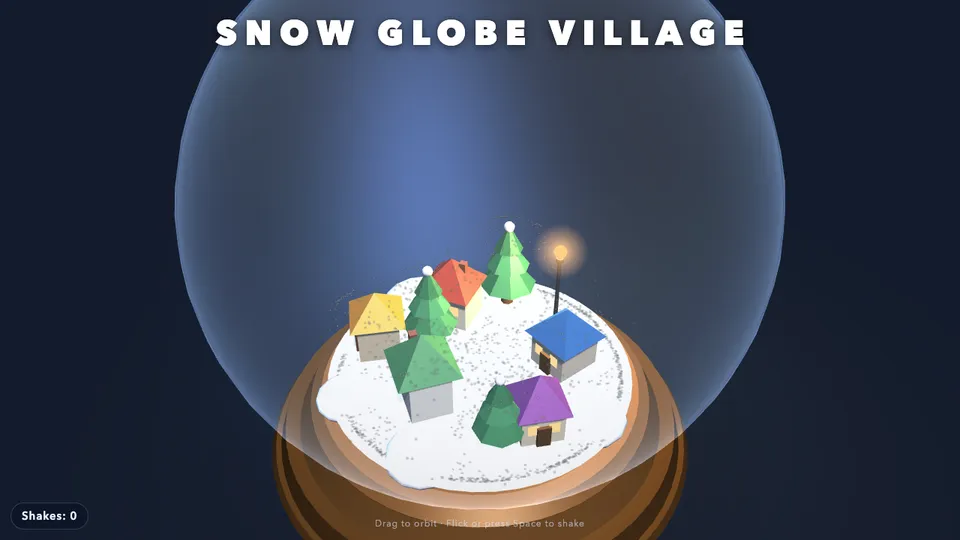
A snow globe with a village inside: 2,000 snow particles kept inside a sphere, shake physics, an orbit camera and shadows.
Download fileMade for ChatGPT, Claude, Gemini, Grok and other AI tools
How to run
- Download the file or copy the prompt.
- Upload or paste it into any AI chat or coding tool, and send.
- Save the HTML it gives you as a file and open it in Chrome.
What it tests
A snow globe with a village inside: 2,000 snow particles kept inside a sphere, shake physics, an orbit camera and shadows.
Runs by model
7 models tried this prompt on a first try; 5 passed. Showing 4.
- swe-2-flash-mediumvia Devin CLI2026-11-06First tryTest rig (automatic)Pass60 fps
- swe-2-maxvia Devin CLI2026-11-07First tryTest rig (automatic)Pass60 fps
- swe-2-flash-highvia Devin CLI2026-11-06First tryTest rig (automatic)Pass60 fps
- swe-2-highvia Devin CLI2026-11-07First tryTest rig (automatic)Pass60 fps
Show the full prompt
Build "SNOW GLOBE VILLAGE": a 3D snow globe on a wooden base using Three.js (from a CDN). Use a fixed random seed of 58 so every load looks the same.

SCENE
- A clear glass sphere sits on a dark walnut base (#5A3A1E). Inside it is a tiny low-poly winter village: exactly 5 houses with different-colored roofs, 3 pine trees, and 1 lamp post with a warm glowing light (#FFC870).
- The glass must read as glass: visible highlights and a faint rim, and the village stays clearly visible through it.
- Background: a deep blue gradient (#0B1B3A at the top to #1E3A6B at the bottom).
- Title "SNOW GLOBE VILLAGE" in white, top center, at least 28px tall, readable in any frozen frame.

SNOW (the stress test)
- 2,000 snowflakes inside the globe. Every flake stays inside the sphere at all times. Not one ever pokes through the glass or appears outside it.
- At rest the snow slowly settles onto the ground and roofs inside the globe.
- SHAKE: drag the globe with the mouse or a finger (or press Space) to shake it. The globe visibly wobbles, and the snow swirls up into a flurry, then drifts back down over about 5 to 8 seconds.
- A counter in the bottom-left corner reads "Shakes: N". It goes up by exactly 1 for each real shake, never on page load or by itself.

CAMERA AND LIGHT
- Orbit around the globe with drag-to-rotate, scroll or pinch to zoom, clamped so the camera never goes inside the glass or below the base.
- Soft shadows: the globe casts a shadow on the surface under the base.

CHECKLIST
1. One index.html file, opens with zero console errors.
2. Exactly 5 houses, 3 trees and 1 glowing lamp post are visible inside the globe.
3. No snowflake is ever outside the glass, including mid-shake.
4. Shaking works by mouse drag, touch drag and Space, and the snow visibly swirls then settles.
5. The "Shakes: N" counter changes only on a real shake.
6. The camera can't clip inside the glass or below the base.
7. Runs smoothly with 2,000 flakes, and works on iPhone.

RULES FOR EVERY BUILD
- Output ONE self-contained file named index.html: inline CSS and JS, any library only from a public CDN, no other files, no build step. Add <link rel="icon" href="data:,"> so there is no favicon 404.
- It must open straight from disk in desktop Chrome and on an iPhone in Safari, fill the screen, and resize cleanly with no scrollbars.
- Zero console errors or warnings on load and while interacting.
- Animation runs on requestAnimationFrame and stays smooth (about 60fps on a laptop).

WORK LOOP (do this yourself before answering)
1. Build the file.
2. If you can run code, open it in a browser, read the console, take screenshots at 3 s and 6 s, and test the interactions. If you can't run code, mentally trace the code against the checklist line by line.
3. Mark every checklist item PASS or FAIL. Mark PASS only when it is visibly true on screen, not just present in the code.
4. Fix every FAIL and recheck. Repeat until all items pass.
5. Final answer: the complete index.html in ONE code block, output once, then the checklist with PASS/FAIL. Nothing else.
Built one? Post it on X and tag @wikiwaynePost on X