Brick Island Eruption
PL-079HardRooms & miniaturesThree.js
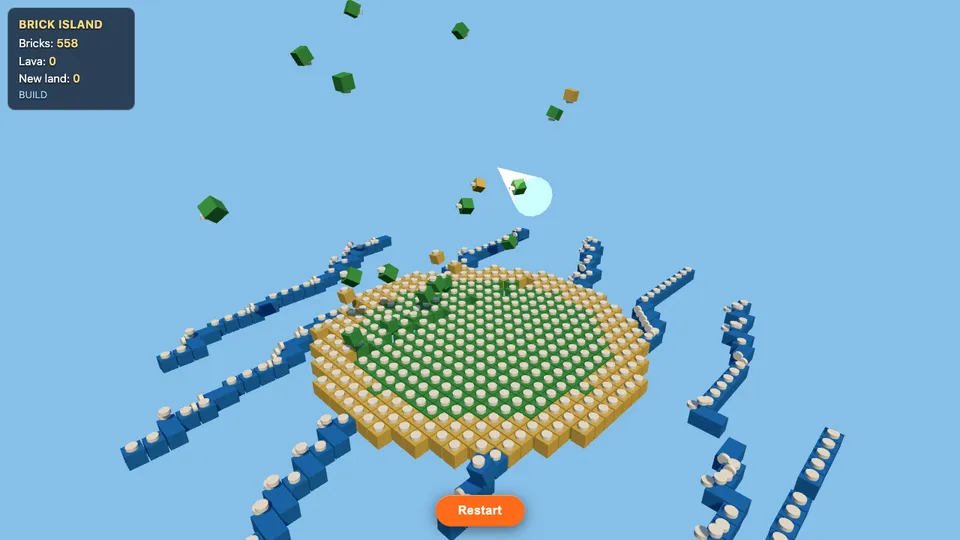
A toy-brick island that erupts: instancing, a scripted multi-phase animation, particle-like physics and lava turning into land.
Download fileMade for ChatGPT, Claude, Gemini, Grok and other AI tools
How to run
- Download the file or copy the prompt.
- Upload or paste it into any AI chat or coding tool, and send.
- Save the HTML it gives you as a file and open it in Chrome.
What it tests
A toy-brick island that erupts: instancing, a scripted multi-phase animation, particle-like physics and lava turning into land.
Runs by model
7 models tried this prompt on a first try; 3 passed. Showing 4.
- swe-2-mediumvia Devin CLI2026-11-07First tryTest rig (automatic)Pass60.1 fps
- swe-2-maxvia Devin CLI2026-11-07First tryTest rig (automatic)Pass60 fps
- swe-2-highvia Devin CLI2026-11-07First tryTest rig (automatic)Pass60 fps
- swe-2-flash-highvia Devin CLI2026-11-06First tryTest rig (automatic)Fail
It didn't pass the test rig's automatic checks.
Show the full prompt
PL-079 "Brick Island Eruption": build a toy-brick island that erupts, in a single HTML file using Three.js (CDN). Everything is made of instanced bricks (use THREE.InstancedMesh, at most 6 draw calls for all bricks).

SCENE AND TIMELINE (runs by itself, loops every 60 s, "Restart" button bottom-center)
- Phase 1, 0 to 20 s, BUILD: bricks (1 x 1 x 1 and 2 x 1 x 1, glossy plastic look, small round studs on top) fly in and snap into place until the island has at least 1000 bricks: a sand-yellow #e8c35a beach ring, green #3fa34d hills, a grey #7a7f87 volcano 14 bricks tall with a dark crater, a village of 6 or more red-roofed houses, 5 or more palm trees, a lighthouse with a white and red stripe and a light that sweeps, and a blue #1e78d6 brick sea around it.
- Phase 2, 20 to 25 s, RUMBLE: the volcano shakes (0.1 unit sideways jitter), smoke bricks puff out of the crater.
- Phase 3, 25 to 50 s, ERUPTION: at least 200 orange #ff6a1a glowing lava bricks launch out of the crater in arcs with gravity and land on the slope. They then stream downhill as a lava river (bricks sliding along a path of at least 20 steps) to the sea, where each lava brick that reaches the water turns black #1a1a1a ("sets") and stays, so black new land visibly grows into the sea. 12 or more bricks on the village side must be hit and knocked loose, tumbling.
- Phase 4, 50 to 60 s, CALM: smoke fades, the camera pulls back to a wide shot, then the loop restarts.
- Camera: slow orbit, with a push-in toward the volcano at 20 s and a pull-back at 50 s. Drag orbits when the user touches it, then the auto camera resumes after 5 s idle.
- Lights: warm sun with soft shadows; lava bricks emit an orange point light that visibly lights nearby bricks.
- HUD (top-left): "Bricks: N" (live count of placed bricks), "Lava: N" (lava bricks launched), "New land: N" (lava bricks turned black).
- Fixed seed 79.

CHECKLIST
1. Screenshot at 18 s: at least 1000 bricks, all listed island parts clearly readable (beach, hills, volcano, 6 houses, 5 palms, lighthouse).
2. Screenshot at 30 s: orange glowing lava bricks in the air and on the slope, with orange light on nearby bricks.
3. Screenshot at 48 s: a continuous lava river reaches the sea and a patch of black bricks has grown into the water (New land at least 40).
4. Counters are real: Bricks matches the instance count, Lava counts launches, New land counts bricks that actually turned black.
5. Bricks never overlap by more than 0.1 unit at rest and no brick floats in the air at rest (check 20 random bricks).
6. At most 6 draw calls for bricks, smooth (about 60 fps desktop, 30 or more iPhone), zero console errors, Restart works.

RULES FOR EVERY BUILD
- Output ONE self-contained file named index.html: inline CSS and JS, three.js from a public CDN only (for example https://cdn.jsdelivr.net/npm/three@0.160.0/build/three.module.js with an import map, or the r128 script tag), no other files, no build step, no external images, models, fonts or audio. Add <link rel="icon" href="data:,"> so there is no favicon 404.
- It must open straight from disk in desktop Chrome and on an iPhone in Safari with touch, fill the screen, resize cleanly, and show no scrollbars at 390x844 or 1280x720. Cap devicePixelRatio at 2. Clamp the frame time to 0.05 s. Pause when the tab is hidden.
- Zero console errors or warnings on load and while interacting. Never log in a per-frame loop.
- Public-safe: no real people, no brand names or logos, no copyrighted characters.
- Every on-screen counter or readout must change only because of the real event it names (never a timer that fakes it) and must also be available as window.__stats so it can be checked by script.
- A frozen frame must be readable: every label, counter and button has contrast of at least 4.5:1 against what is behind it and text at least 14 px.

WORK LOOP (do this yourself before answering; take as many turns as you need)
1. Build the file.
2. If you can run code: open it in a real browser, read the console, take screenshots at 3 s, 10 s and 20 s, and exercise every interaction. If you cannot run code, trace the code against the checklist line by line and say so.
3. Mark every checklist item PASS or FAIL with the measured number or what you saw. Mark PASS only when it is visibly true on screen, not just present in code.
4. Fix every FAIL and recheck. Repeat until all items pass or you run out of turns, then say which still fail.
5. Final answer: the complete index.html in ONE code block, output once, then the checklist with PASS/FAIL. Nothing else.
Built one? Post it on X and tag @wikiwaynePost on X