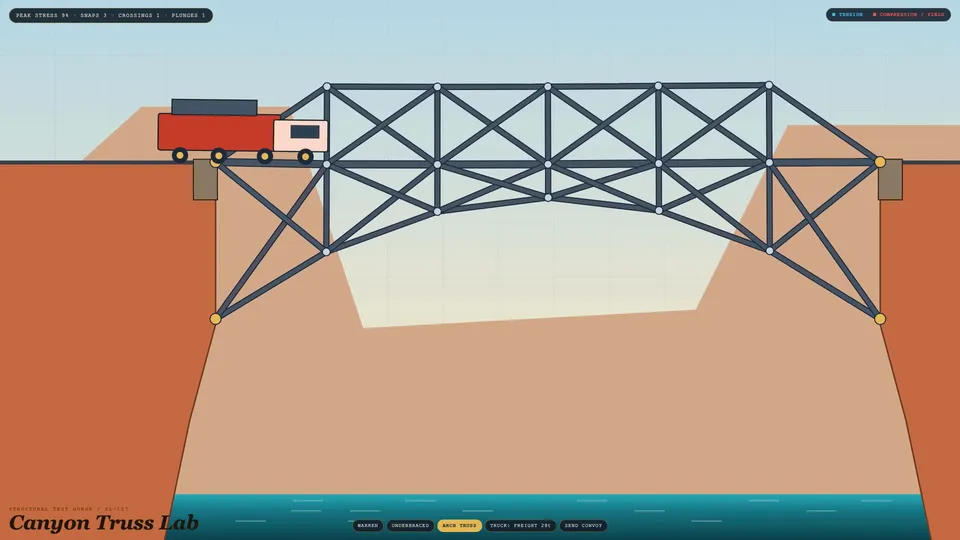
Canyon Truss Lab
PL-157HardPhysics playgroundsCanvas 2D
A 2D bridge engineering sandbox: real strain and yield in truss beams, beams that snap, sprung multi-axle trucks and honest crossing counters.
Download fileMade for ChatGPT, Claude, Gemini, Grok and other AI tools
How to run
- Download the file or copy the prompt.
- Upload or paste it into any AI chat or coding tool, and send.
- Save the HTML it gives you as a file and open it in Chrome.
- Open it with ?test=1 and look in the browser console for the TEST lines.
What it tests
A 2D bridge engineering sandbox: real strain and yield in truss beams, beams that snap, sprung multi-axle trucks and honest crossing counters.
The checks
- First frame: canyon cliffs, truss bridge and river span at least 55% of the screen height, activeBeams >= 15, and static equilibrium settles with abutment pins fixed within 0.5 px.
- Honest axial stress: parking the 16 t Crane Rig at mid-span raises peakStressPct at least 3x above unloaded self-weight, with top-chord compression and bottom-chord tension showing opposite strain signs.
- Overload collapse: sending the 16 t Crane Rig onto the UNDERBRACED preset pushes peakStressPct >= 100, increments snappedBeams >= 1, and drops the vehicle into the river (plunges +1).
- Reinforced arch success: switching to ARCH TRUSS carries the 28 t Twin Freight Hauler all the way to the right cliff with snappedBeams === 0 for that run and increments crossings by 1.
- Attract showcase: running 30 s of hands-free advance() produces >= 2 crossings (light + reinforced heavy) and >= 1 mid-canyon plunge, with zero console errors.
Runs by model
- Gemini 4 Carbon Mediumvia Devin Desktop chat2026-11-19First tryAgent checkPass60 fps
Show the full prompt
CANYON TRUSS LAB: Stress-Color Bridge & Heavy Convoy
HOOK OBJECT: window.__truss

Build "CANYON TRUSS LAB": a side-view 2D structural-engineering physics sandbox and convoy test in Canvas 2D (no libraries). Riveted road decks and triangulated truss struts span a sunlit sandstone gorge over a rushing river; every beam colors live by real axial tension and compression, overloaded members snap with flying rivets, and collapsed spans plunge with vehicles into the river below before a stronger arch truss carries the heavy freight across.

LOOK
- Style: crisp architectural blueprint meets warm desert-gorge illustration, palette sky #EAE4D3 to #B9D8E8, sandstone cliff #C86B43, deep canyon shadow #6E3826, river #2298A8, unloaded steel #465466, tension cyan #29B6F6, compression/overload crimson #F03E3E, brass pin #E8B954.
- Subject: a 36 m canyon gap between two stone abutments 18 m above a flowing river, pin-jointed road nodes and truss struts with bolted gusset plates and live peak-stress readout, plus 3 multi-axle sprung vehicles (Scout Pickup 4 t, Crane Rig 16 t, Twin Freight Hauler 28 t).
- FIRST FRAME (t = 0, no input): full side elevation of the canyon abutments, river, complete multi-bay truss bridge and waiting Scout Pickup on the left approach filling at least 55% of the screen height, stress legend and counters cleanly in the top bar never touching the bridge.

MOTION / PLAY
- Controls: click/drag between joints (mouse or touch) in BUILD mode to add or remove struts or toggle presets (LIGHT WARREN, UNDERBRACED, ARCH TRUSS); press Space or TEST CONVOY to send the selected vehicle (keys 1–3) rolling across on sprung wheels; camera setter setCamera(panX, zoom) pans and zooms smoothly.
- Hand-written structural physics: sub-stepped Verlet / damped axial-spring solver (gravity 9.81 m/s², pinned abutment anchors). Each strut computes real axial strain `(L - L0) / L0` and stress ratio `|strain| / yieldStrain` (0–100%+); if any strut exceeds 100% yield for >0.08 s, it snaps cleanly, shedding rivet sparks, and any disconnected deck segments + vehicle fall under gravity into the river with a whitewater splash!
- ATTRACT MODE: with no input, a hands-free 28–30 s engineering showcase runs on load: (1) Scout Pickup crosses a light truss cleanly, (2) the heavy Crane Rig rolls onto an under-braced span, struts blaze crimson past 100%, the span snaps mid-gorge and splashes into the river, and (3) the auto-engineer constructs the reinforced Arch Truss and drives the 28 t Twin Freight Hauler safely to the right cliff! Any input takes over; the demo resumes after 8 s with no input.

SOUND
- Strut placed or riveted -> crisp metallic ratchet click.
- Rising structural load (>70%) -> tense creaking steel cable groan whose pitch climbs with peak stress %.
- Strut snap -> sharp rifle-crack steel ping; river impact -> deep boom and foaming water splash.
- Successful right-cliff crossing -> two-tone air-horn celebration.

COUNTERS
stats() returns { fps, peakStressPct, snappedBeams, crossings, plunges, activeBeams }.
- peakStressPct: current highest axial stress percentage (0–100+) across all intact beams.
- snappedBeams: +1 each time an overloaded beam actually breaks during simulation. Never on a timer, never on load.
- crossings: +1 exactly when a vehicle's rear axle reaches the right cliff abutment intact.
- plunges: +1 when a vehicle drops into the canyon river surface and triggers a splash.
- On screen: top bar "PEAK STRESS NN% · SNAPS N · CROSSINGS N · PLUNGES N", readable in a paused frame and never over the truss.

CHECKS for ?test=1
With ?test=1, run an accelerated self-test that measures real positions and real events (not self-set flags) and logs "TEST n PASS" or "TEST n FAIL: reason" to the console and to window.__testResults:
1. First frame: canyon cliffs, truss bridge and river span at least 55% of the screen height, activeBeams >= 15, and static equilibrium settles with abutment pins fixed within 0.5 px.
2. Honest axial stress: parking the 16 t Crane Rig at mid-span raises peakStressPct at least 3x above unloaded self-weight, with top-chord compression and bottom-chord tension showing opposite strain signs.
3. Overload collapse: sending the 16 t Crane Rig onto the UNDERBRACED preset pushes peakStressPct >= 100, increments snappedBeams >= 1, and drops the vehicle into the river (plunges +1).
4. Reinforced arch success: switching to ARCH TRUSS carries the 28 t Twin Freight Hauler all the way to the right cliff with snappedBeams === 0 for that run and increments crossings by 1.
5. Attract showcase: running 30 s of hands-free advance() produces >= 2 crossings (light + reinforced heavy) and >= 1 mid-canyon plunge, with zero console errors.

KEEP IT SHORT
- Keep the whole file under about 1,500 lines (soft target) so you can write it in one pass and finish well inside 15 minutes.
- Save lines with helpers, loops and instancing, not by dropping features. Everything above must really work: no placeholders, no TODOs.

BUILD RULES (all required):
- Deliver ONE self-contained HTML file: inline CSS and JS, no build step, no local assets. Libraries only from a CDN. If you use Three.js, use exactly this import map: {"imports":{"three":"https://cdn.jsdelivr.net/npm/three@0.160.0/build/three.module.js","three/addons/":"https://cdn.jsdelivr.net/npm/three@0.160.0/examples/jsm/"}}
- It must open straight from disk in desktop Chrome and on an iPhone (Safari), fill the full screen, handle resize and touch, and stay smooth (target 60 fps).
- It must look stunning in the very FIRST frame: no black screen, no loading wait, no tiny subject. The main subject fills at least 50% of the screen height.
- SOUND (required): all sound is made in code with Web Audio (no audio files). Show a small "🔊 TAP FOR SOUND" chip; on the first tap create ONE AudioContext, route everything through a master gain of 0.6 into a DynamicsCompressor, and hide the chip. Also expose enableAudio() on the hook object named at the top.
- Expose the hook object named at the top with: setCameraOrbit(azimuthDeg, elevationDeg, distance) (or an equivalent camera setter), advance(seconds) that steps the simulation exactly that much for still captures, enableAudio(), and stats() returning {fps, ...the counters named above}. Use a fixed random seed of 360 so every run is the same.
- Every on-screen counter must count a real event you can see happen. No fake numbers.
- No text overlapping the subject; any label must be readable in a paused frame.
- No brand logos, no real people, no copyrighted characters, brand names or logos.

FAILURE MODES TO AVOID
- Fake painted stress colors that don't come from real beam length changes under weight.
- Solver explosions where joints fly to NaN/Infinity when a beam snaps or a heavy truck lands.
- Vehicles driving along a hardcoded Y curve in mid-air after the road deck underneath them has collapsed!
- Bridge drawn as a tiny thin line in the middle of an empty screen.
- HUD overlapping the vehicles or top truss chord.
- The same variable declared twice, or methods called on objects that don't exist yet.

SELF-TEST LOOP
- If you can run code: build the file, open it, read the console, run ?test=1, and take screenshots at 3 s, 10 s and 30 s at 1280x720 and 390x844. Look at the screenshots and fix what looks wrong. Fix and retest until all 5 checks pass with zero console errors. Mark anything you could not run as UNMEASURED; never invent results.
- If you are chat-only: go through this prompt line by line, check your code against each line, and fix anything that would fail. Then write one corrected, complete file.
- Final answer: ONE complete HTML file in ONE code block, then the 5 checks marked PASS, FAIL or UNMEASURED. No snippets, no "rest unchanged".
Built one? Post it on X and tag @wikiwaynePost on X