Skeleton Watch Exploded
PL-080HardMachinesThree.js
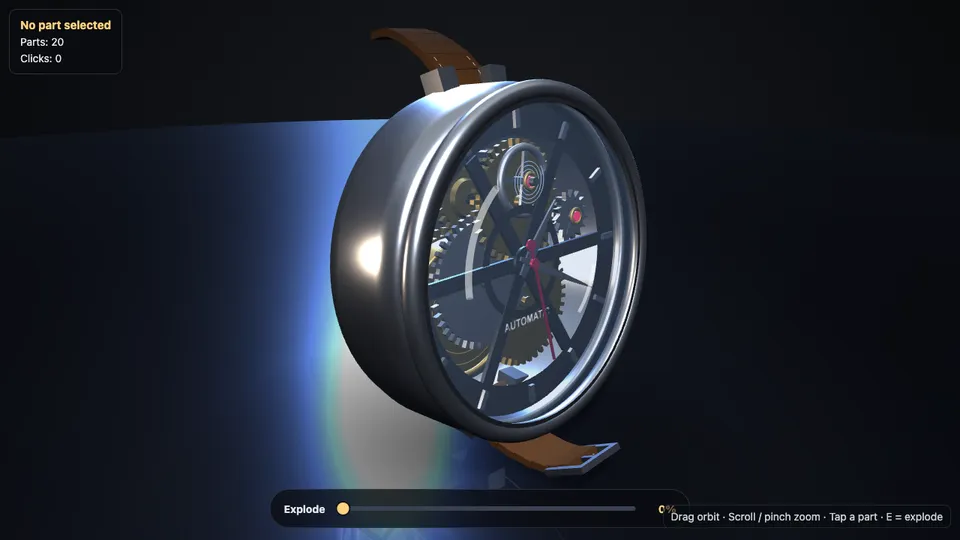
An interactive mechanical skeleton watch: gear meshing math, an exploded-view layout, labels, picking and precise timing.
Download fileMade for ChatGPT, Claude, Gemini, Grok and other AI tools
How to run
- Download the file or copy the prompt.
- Upload or paste it into any AI chat or coding tool, and send.
- Save the HTML it gives you as a file and open it in Chrome.
What it tests
An interactive mechanical skeleton watch: gear meshing math, an exploded-view layout, labels, picking and precise timing.
Runs by model
7 models tried this prompt on a first try; 2 passed. Showing 4.
- swe-2-highvia Devin CLI2026-11-07First tryTest rig (automatic)Pass60.1 fps
- swe-2-mediumvia Devin CLI2026-11-07First tryTest rig (automatic)Pass60 fps
- swe-2-flash-highvia Devin CLI2026-11-06First tryTest rig (automatic)Fail
A script error stopped the page from starting.
- swe-2-flash-maxvia Devin CLI2026-11-06First tryTest rig (automatic)Fail
No code came back.
Show the full prompt
PL-080 "Skeleton Watch Exploded": build an interactive 3D mechanical skeleton watch with an exploded view, in a single HTML file using Three.js (CDN). All original, no brand name or logo on the watch (the dial text is the plain word "AUTOMATIC" only).

SCENE
- Dark studio: background #0c0d10, a soft spotlight, a rim light, a glossy dark floor with a faint reflection of the watch.
- The watch stands upright and slowly turns. Required parts, each its own named object: crown, case (brushed steel #b9bec6), sapphire glass (see-through, with a visible highlight), bezel ring, skeleton dial plate with 12 hour markers, hour hand, minute hand, seconds hand, mainspring barrel, at least 6 gears (different sizes, 12 to 60 teeth, brass #c9a24b and steel) that mesh and rotate at ratios matching their teeth counts, a balance wheel that oscillates back and forth (about 4 swings per second, plus or minus 220 degrees), an escape wheel, 2 jewels (red #d6204a), and a leather strap (dark brown) with stitching lines.
- The hands show the real current time of the visitor's clock and tick once per second (the seconds hand steps, not sweeps).
- A slider at the bottom (desktop and touch) "Explode" from 0 to 100 percent: parts move apart along the watch axis by their layer order (case back to glass) with a smooth ease, and each part shows a small label (14 px white on dark) only when the slider is above 60 percent. The slider also works by pressing E to toggle between 0 and 100 over 1.2 s.
- Drag orbits, wheel or pinch zooms between 3 and 12 units. Click or tap a part to highlight it (emissive outline) and show its name in a panel top-left.
- A "Parts: N" readout shows how many named parts are visible, and a "Clicks: N" readout counts real part selections.
- Fixed seed 80.

CHECKLIST
1. Screenshot at 3 s with Explode at 0: a complete, closed watch with glass, hands and strap, clearly recognisable.
2. Screenshot at Explode 100: at least 12 separate parts spaced apart along one axis with no part overlapping another by more than 10 percent, labels readable.
3. Gears mesh visibly (no teeth passing through each other) and gear speeds follow the teeth ratios (check two gears: speed ratio within 5 percent of their teeth-count ratio).
4. Hands show the real time within 1 second, the balance wheel oscillates about 4 times per second.
5. Selecting a part highlights it and fills the name panel; Clicks goes up by exactly 1 per selection; Parts matches the real visible count.
6. Smooth (about 60 fps desktop, 30 or more iPhone), zero console errors.

RULES FOR EVERY BUILD
- Output ONE self-contained file named index.html: inline CSS and JS, three.js from a public CDN only (for example https://cdn.jsdelivr.net/npm/three@0.160.0/build/three.module.js with an import map, or the r128 script tag), no other files, no build step, no external images, models, fonts or audio. Add <link rel="icon" href="data:,"> so there is no favicon 404.
- It must open straight from disk in desktop Chrome and on an iPhone in Safari with touch, fill the screen, resize cleanly, and show no scrollbars at 390x844 or 1280x720. Cap devicePixelRatio at 2. Clamp the frame time to 0.05 s. Pause when the tab is hidden.
- Zero console errors or warnings on load and while interacting. Never log in a per-frame loop.
- Public-safe: no real people, no brand names or logos, no copyrighted characters.
- Every on-screen counter or readout must change only because of the real event it names (never a timer that fakes it) and must also be available as window.__stats so it can be checked by script.
- A frozen frame must be readable: every label, counter and button has contrast of at least 4.5:1 against what is behind it and text at least 14 px.

WORK LOOP (do this yourself before answering; take as many turns as you need)
1. Build the file.
2. If you can run code: open it in a real browser, read the console, take screenshots at 3 s, 10 s and 20 s, and exercise every interaction. If you cannot run code, trace the code against the checklist line by line and say so.
3. Mark every checklist item PASS or FAIL with the measured number or what you saw. Mark PASS only when it is visibly true on screen, not just present in code.
4. Fix every FAIL and recheck. Repeat until all items pass or you run out of turns, then say which still fail.
5. Final answer: the complete index.html in ONE code block, output once, then the checklist with PASS/FAIL. Nothing else.
Built one? Post it on X and tag @wikiwaynePost on X